
Documentation
Create Layers
Create Layers is a predefined hierarchical system that automatically organizes a 3ds Max scene into standardized categories. Designed to maintain project consistency and improve readability for high-end visualization teams.
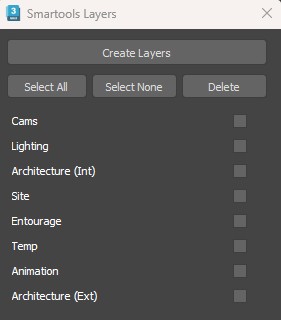
01. MASTER LAYERS AND CONTENT
0001
TMP (Temporary)
Used for non-renderable or workflow-related objects.
Keeps technical objects separated from geometry.
Cameras
Handles all camera-related objects and shot management.
Separates cameras based on usage for easier management.
Lighting
Organizes all lighting elements and environment setups.
Provides a structured setup for rendering control.
Arch (Architecture)
The core architectural geometry group.
Building elements grouped by construction type.
Site
Exterior environment and terrain components.
Organizes all external environment elements.
Entourage
Decorative secondary objects and scene enhancements.
Groups non-structural elements that enhance the scene.
Animation
All animation-related systems and simulations.
Keeps simulations isolated from static geometry.
Design Info
2D reference drawings and technical documentation.
Stores reference drawings inside the 3D scene.
02. HOW IT WORKS (IN PRACTICE)
Result: A fully organized, production-ready layer structure in seconds.
In Simple Terms
The tool automatically lets you build a complete, industry-standard layer structure in your scene. Everything, from walls and furniture to lights and cameras, is sorted into clearly defined categories, making your file cleaner, easier to manage, and ready for production.