
Documentation
Scene Organizer
Smartools Scene Organizer is a 3ds Max utility designed to organize, select, isolate, delete, or assign BIM metadata-based objects into structured layers. It reads BIM-style properties from scene objects and allows for high-speed automated processing.
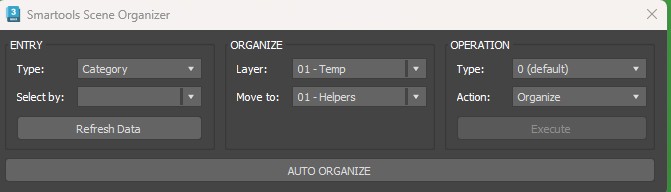
01. INPUT
Data Type
Defines which BIM property will be used to classify the objects:
Category Name: Groups objects by their general BIM category (walls, doors, furniture, etc).
Family Name: Groups objects by their family definition.
Type Name: Groups objects by their specific type.
Filter By
Displays all detected values for the selected Data Type. If “Category Name” is active, this list shows all available categories found in the scene.
Search & Utilities
Used with Match modes to search for text patterns. The [#] button helps analyze the scene for repeated patterns.
Search: Filters available BIM values by text. Essential for complex scenes.
Clear: Resets the search field and restores the full list.
Refresh Data: Re-scans the scene to update BIM information and object counts.
02. OUTPUT
Layer Management
Custom
Allows for the creation of custom layer names using a numeric prefix and text name.
Example Output: 0201 – Misc
03. ACTION
Scope
Defines which objects in the scene will be affected:
Visible / Selection: Limits action to what you see or what you have selected.
Geometry / Objects / Helpers: Filter by specific object classes.
Mode
The specific operation to execute:
Set BIM: Assigns or refreshes metadata on objects.
Select / Isolate: Quickly find or focus on specific elements.
Delete: Remove matching objects from the scene.
Auto Organize
Automatically organizes the entire scene into layers based on predefined remapping rules, minimizing manual setup for a cleaner structure.
In Simple Terms
This tool helps users clean and structure complex imported BIM or Revit-based scenes in 3ds Max by automatically identifying objects through their BIM metadata and placing them into organized layers. It can also be used to quickly find, isolate, select, delete, or reassign objects based on Category, Family, or Type.