
Documentation
Smart Collapse
Collapse By Utility is a 3ds Max optimization tool designed to reduce scene complexity by merging multiple objects into fewer optimized meshes. Boost viewport performance and organize geometry in seconds.
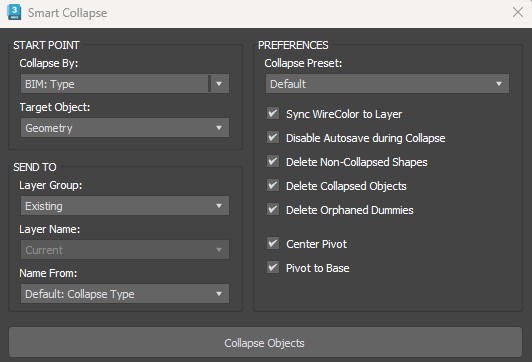
01. SOURCE
Collapse By
Defines the rule used to group objects before collapsing them:
Layer: Collapses based on current layers.
WireColor: Groups objects sharing the same wireframe color.
Selection: Only the current selection.
Material: Groups by assigned material.
BIM (Category/Family/Type): Uses BIM metadata for grouping.
Overlap: Detects and collapses overlapping geometry.
Match (Object/Material Name): Searches for specific text patterns.
Target object
Defines which objects are included: Geometry, Selection, or Visible.
Match Pattern & [#] Button
Used with Match modes to search for text patterns. The [#] button helps analyze the scene for repeated patterns.
02. DESTINATION
Layer Management
Naming Convention (Name From)
03. OPTIONS
Collapse Presets
Quickly adjust settings for: Generic (FBX), Revit, Rhino, Sketchup, and more.
Mesh & Geometry
Advanced Settings
In Simple Terms
This tool helps users optimize heavy 3ds Max scenes by automatically combining many small imported objects into cleaner, lighter mesh objects. It is especially useful for Revit, Rhino, SketchUp, and FBX imports, where scenes often contain thousands of separated parts.